
From Sticky Notes to User Flows: How Product Teams Use DrawIt
Product teams spend hours in workshops with sticky notes and whiteboards. DrawIt converts that thinking into shareable, updatable diagrams in minutes.
The sticky note workshop is a product ritual. Colored squares on a whiteboard. Arrows in marker. A room full of people pointing at the wall and arguing about whether this step comes before or after that one.
The output is always the same: a photograph of the whiteboard, sent to Slack, immediately obsolete.
There is nothing wrong with the workshop. The thinking is good. The problem is the artifact. A photograph cannot be updated. It cannot be shared with someone who was not in the room. It cannot become the living documentation the team needs.
What product teams actually need from a diagram
Product managers work at the intersection of business, design, and engineering. The diagrams they need are translation tools. A user flow translates a product decision into something a designer can implement and an engineer can build.
The qualities that make a product diagram useful are different from what makes a technical diagram useful.
Clarity over precision. The user flow does not need to be technically accurate. It needs to be clear enough that every stakeholder reads it the same way.
Easy to update. A user flow changes every sprint. A tool that takes thirty minutes to update will be abandoned. A tool that updates in two minutes will be used.
Exportable everywhere. The design team needs it in Figma. The engineering team needs it in Notion. The stakeholder needs it in a slide. A diagram that exports to PNG in one click gets used everywhere.
The three diagrams product teams reach for most
In conversations with product teams using DrawIt, three diagram types come up consistently.
User journey maps. The full emotional arc of a user experience. Not just the steps, but the user's state at each step: confused, relieved, frustrated, delighted. These diagrams live in product reviews and kickoff decks. They set the context before any design or engineering discussion.
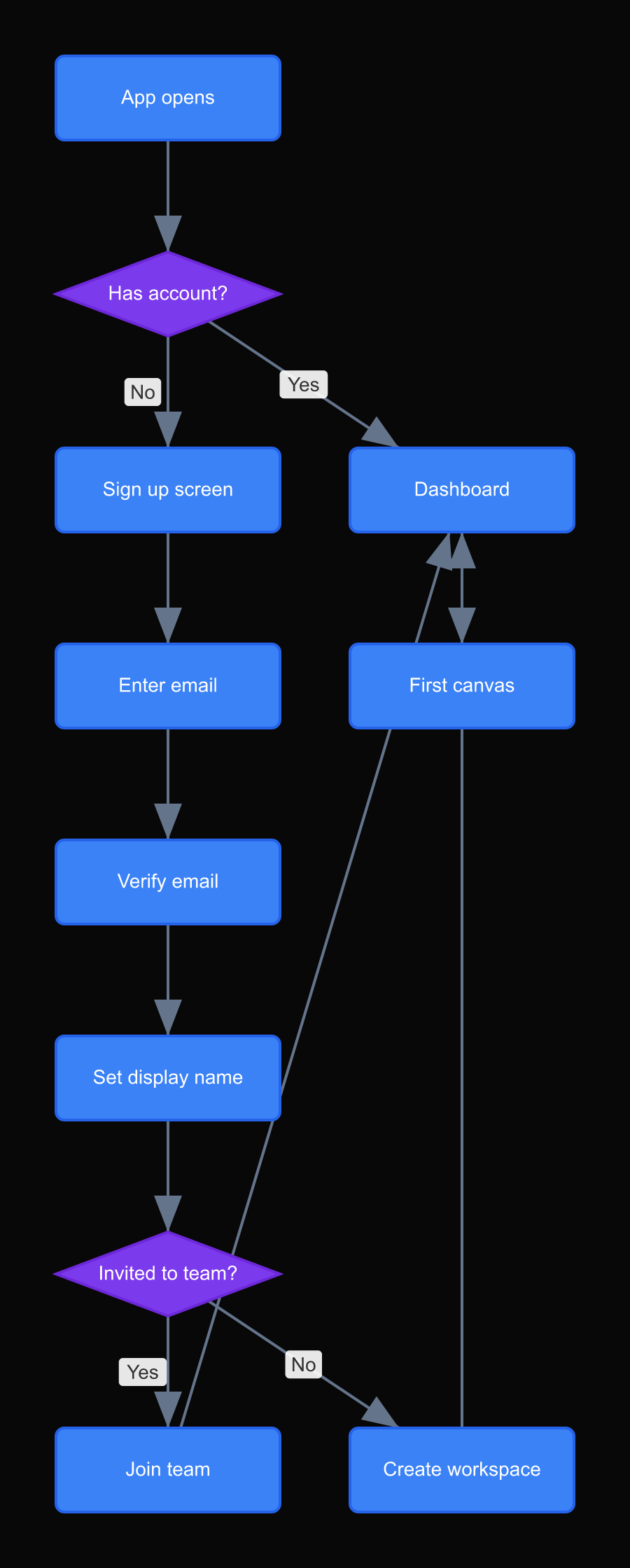
Screen flow diagrams. Every screen in a feature, with arrows showing every transition. These are the diagrams that prevent the classic "where does the user go after they click Cancel?" conversation from happening three times. When the screen flow is drawn before design begins, every question has an answer.
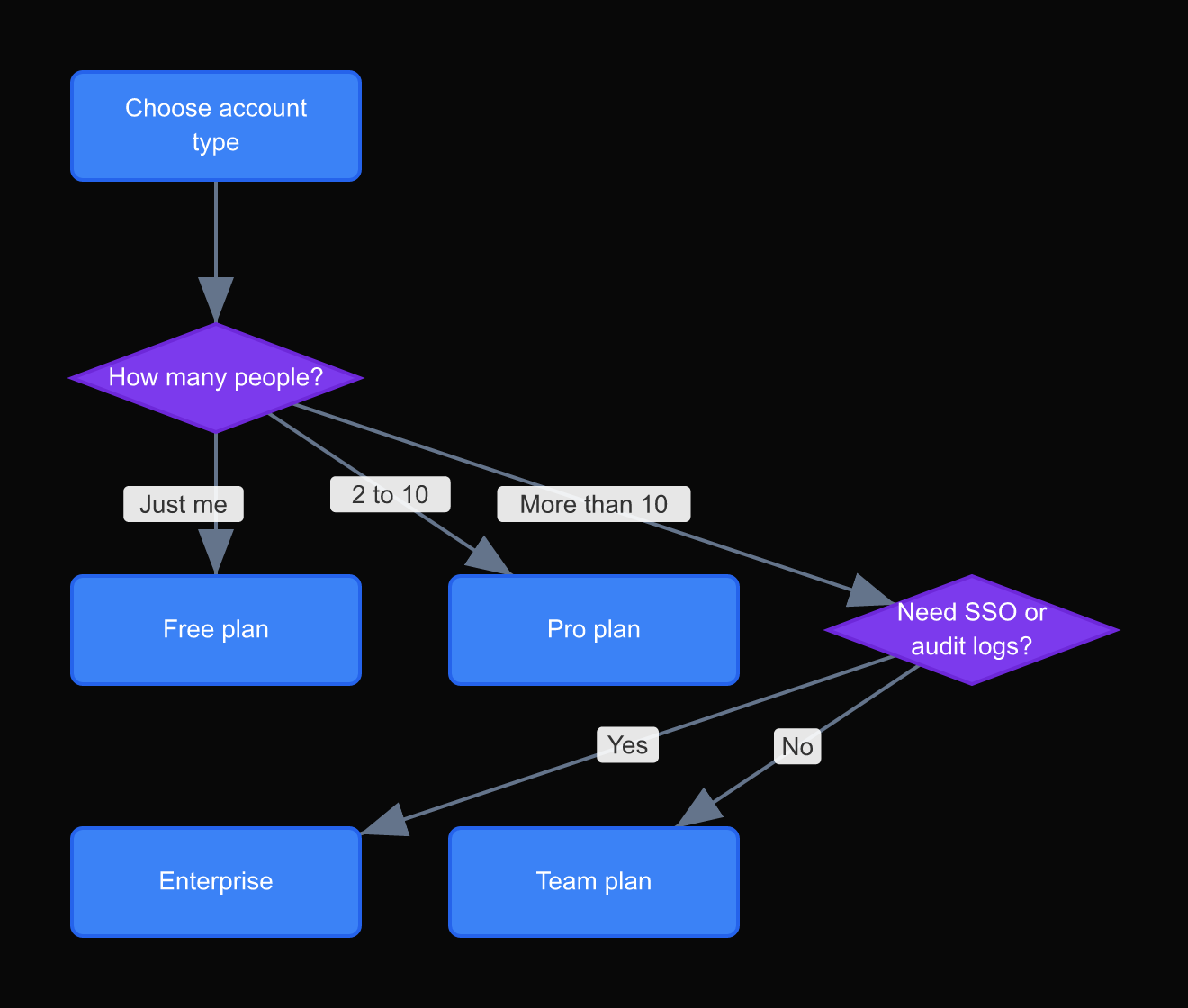
Decision trees. When the product behavior depends on user state or account type, a decision tree makes the logic visible. The engineering team can implement directly from it. The QA team can generate test cases from it.
How a product team uses DrawIt in practice
The workflow that product teams have settled on looks like this.
Before sprint planning, the PM describes the feature to DrawIt and asks for a screen flow. DrawIt generates the diagram. The PM edits it: removes screens that are out of scope, adds transitions that are missing, corrects the labels. This takes ten to fifteen minutes.
The diagram goes into the sprint planning document. During the meeting, the team annotates it: this screen is complex (two-week effort), this transition needs a loading state, this error path is not in scope for v1.
After planning, the PM updates the diagram to reflect the decisions. The final diagram is what the designer builds from. It is also what the engineer uses to write acceptance criteria.
The photograph of the sticky note whiteboard still happens. But it now takes five minutes to convert it into a proper diagram that can be shared and updated. The workshop thinking becomes a living artifact instead of a time-stamped photograph.
The setup that makes this work
The key is having DrawIt open during the workshop, not after it. When the whiteboard fills up, someone types a description of what is on the board. The diagram appears. The team reacts to the digital version while the whiteboard is still fresh.
This is a small shift in habit with a large effect on output quality. The diagram is already in shareable form before the room empties.
The artifact problem in product work
Product work produces a lot of artifacts. Specs, wireframes, user research notes, meeting recordings, decision logs. The problem is not volume. The problem is that most of these artifacts are write-once. They are created, circulated, and then become stale without anyone noticing.
A user flow diagram has a different lifecycle when it is easy to update. It starts as a sketch in a planning meeting. It becomes the reference during design. It gets annotated during engineering. It becomes the acceptance criteria document during QA. It ends up in the post-launch retro as the thing the team compares against what was actually shipped.
That lifecycle requires a diagram that can be updated in real time, not one that takes an hour to revise. When updating the diagram costs five minutes, product teams update it. When it costs an hour, they annotate the stale version with comments until the comments are longer than the original diagram.
The move from sticky-note workshop output to living product artifact is not a change in process. It is a change in tooling. When the tool is fast enough, the process naturally follows.
DrawIt is designed around that lifecycle. The diagram you make in the planning meeting is the same diagram that goes through design, engineering, and QA. The history is visible. The decisions are recorded. The artifact does not go stale because updating it is the same action as creating it.
What changes when diagrams are easy
When product diagrams are cheap to produce, they get produced earlier in the process. Instead of diagramming after the decision, you diagram while making it. The diagram surfaces ambiguity before it becomes a week of rework.
The teams that use DrawIt most effectively describe the same change: conversations stopped being about "what do we want to build" and started being about "is this diagram right." That is a much more productive conversation.
Ready to try this yourself?
Try this in DrawIt